SMS Opt-In Consent Process
Verbal Consent Script
Before collecting consent in the application, the shop employee reads the following to the customer:
"We use a platform called Repair Bay Evolution to keep you updated on your vehicle repair. With your permission, we'd like to send you text messages about your repair status, including progress updates and when your vehicle is ready. Message and data rates may apply, and you can reply STOP at any time to opt out. Do you consent to receiving these text messages?"
How SMS Consent Is Collected
After the customer verbally agrees, the shop employee confirms it in the application by clicking the "Confirm SMS Consent" button. This action records the following in our database:
- The customer's phone number
- A timestamp of when consent was granted
- The username of the employee who confirmed consent
- The company associated with the repair order
SMS messaging is not enabled for a customer until this step is completed.
Confirmation Text Message
Immediately after consent is recorded, the system automatically sends a confirmation SMS to the customer:
"You have opted in to receive SMS updates about your vehicle repair. Reply STOP at any time to opt out. Msg & data rates may apply."
Application Screenshots
Before consent: The shop employee sees the "Confirm SMS Consent" button.

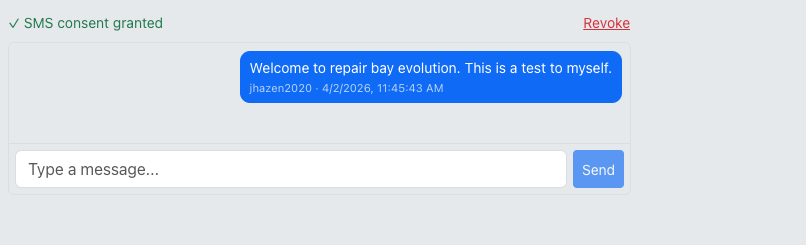
After consent: Once clicked, the consent is recorded with a timestamp and the confirming employee.
Opt-Out
Customers can opt out at any time by replying STOP to any message. The system automatically updates the consent record and no further messages are sent. Customers can also ask the shop to revoke consent through the platform.
See our full SMS Consent Policy for details.